


Page 436 - Gear Technology Solutions
P. 436
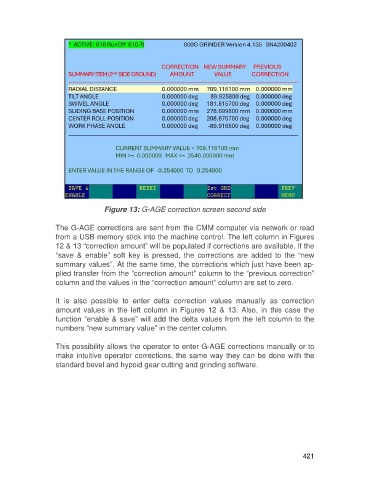
Figure 13: G-AGE correction screen second side

                   The G-AGE corrections are sent from the CMM computer via network or read
                   from a USB memory stick into the machine control. The left column in Figures
                   12 & 13 “correction amount” will be populated if corrections are available. If the
                   “save  &  enable”  soft  key  is  pressed,  the  corrections  are  added  to  the  “new
                   summary values”. At the same time, the corrections which just have been ap-
                   plied transfer from the “correction amount” column to the “previous correction”
                   column and the values in the “correction amount” column are set to zero.

                   It  is  also  possible  to  enter  delta  correction  values  manually  as  correction
                   amount  values  in  the  left  column  in  Figures  12  &  13.  Also,  in  this  case  the
                   function “enable & save” will add the delta values from the left column to the
                   numbers “new summary value” in the center column.

                   This possibility allows the operator to enter G-AGE corrections manually or to
                   make intuitive operator corrections, the same way they can be done with the
                   standard bevel and hypoid gear cutting and grinding software.


                                                                                                     421

