


Page 250 - Gear Technology Solutions
P. 250
17.5  MicroPulse

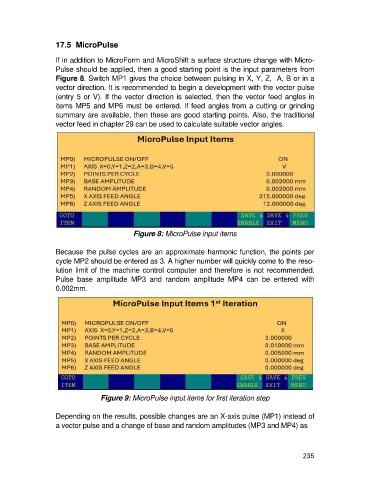
                   If in addition to MicroForm and MicroShift a surface structure change with Micro-
                   Pulse should be applied, then a good starting point is the input parameters from
                   Figure 8. Switch MP1 gives the choice between pulsing in X, Y, Z,  A, B or in a
                   vector direction. It is recommended to begin a development with the vector pulse
                   (entry 5 or V). If the vector direction is selected, then the vector feed angles in
                   items MP5 and MP6 must be entered. If feed angles from a cutting or grinding
                   summary are available, then these are good starting points. Also, the traditional
                   vector feed in chapter 29 can be used to calculate suitable vector angles.


                                             Figure 8: MicroPulse input items

                   Because the pulse cycles are an approximate harmonic function, the points per
                   cycle MP2 should be entered as 3. A higher number will quickly come to the reso-
                   lution limit of the machine control computer and therefore is not recommended.
                   Pulse  base  amplitude  MP3  and  random  amplitude  MP4  can  be  entered  with
                   0.002mm.


                                  Figure 9: MicroPulse input items for first iteration step

                   Depending on the results, possible changes are an X-axis pulse (MP1) instead of
                   a vector pulse and a change of base and random amplitudes (MP3 and MP4) as


                                                                                                     235

