


Page 249 - Gear Technology Solutions
P. 249
17.4  MicroShift

                   After a finished MicroForm development, MicroShift can be activated in addition to
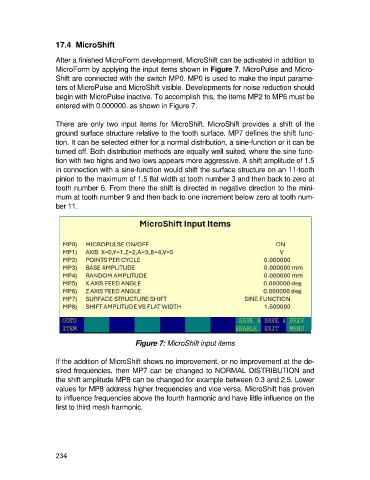
                   MicroForm by applying the input items shown in Figure 7. MicroPulse and Micro-
                   Shift are connected with the switch MP0. MP0 is used to make the input parame-
                   ters of MicroPulse and MicroShift visible. Developments for noise reduction should
                   begin with MicroPulse inactive. To accomplish this, the items MP2 to MP6 must be
                   entered with 0.000000. as shown in Figure 7.

                   There are  only two  input items for MicroShift. MicroShift provides  a  shift of the
                   ground surface structure relative to the tooth surface. MP7 defines the shift func-
                   tion. It can be selected either for a normal distribution, a sine-function or it can be
                   turned off. Both distribution methods are equally well suited, where the sine func-
                   tion with two highs and two lows appears more aggressive. A shift amplitude of 1.5
                   in connection with a sine-function would shift the surface structure on an 11-tooth
                   pinion to the maximum of 1.5 flat width at tooth number 3 and then back to zero at
                   tooth number 6. From there the shift is directed in negative direction to the mini-
                   mum at tooth number 9 and then back to one increment below zero at tooth num-
                   ber 11.


                                              Figure 7: MicroShift input items

                   If the addition of MicroShift shows no improvement, or no improvement at the de-
                   sired frequencies, then MP7 can be changed to NORMAL DISTRIBUTION and
                   the shift amplitude MP8 can be changed for example between 0.3 and 2.5. Lower
                   values for MP8 address higher frequencies and vice versa. MicroShift has proven
                   to influence frequencies above the fourth harmonic and have little influence on the
                   first to third mesh harmonic.


                   234

