


Page 426 - Gear Technology Solutions
P. 426
30.4  Uniflex Summary Input on Phoenix Cutting and
                          Grinding Machines

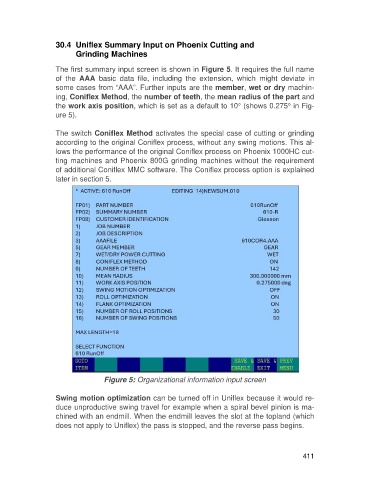
                   The first summary input screen is shown in Figure 5. It requires the full name
                   of  the  AAA  basic  data  file,  including  the  extension,  which  might  deviate  in
                   some cases from “AAA”. Further inputs are the member, wet or dry machin-
                   ing, Coniflex Method, the number of teeth, the mean radius of the part and
                   the work axis position, which is set as a default to 10° (shows 0.275° in Fig-
                   ure 5).

                   The switch Coniflex Method activates the special case of cutting or grinding
                   according to the original Coniflex process, without any swing motions. This al-
                   lows the performance of the original Coniflex process on Phoenix 1000HC cut-
                   ting machines and Phoenix 800G grinding machines without the requirement
                   of additional Coniflex MMC software. The Coniflex process option is explained
                   later in section 5.


                                   Figure 5: Organizational information input screen

                   Swing motion optimization can be turned off in Uniflex because it would re-
                   duce unproductive swing travel for example when a spiral bevel pinion is ma-
                   chined with an endmill. When the endmill leaves the slot at the topland (which
                   does not apply to Uniflex) the pass is stopped, and the reverse pass begins.


                                                                                                     411

